Your AI video text is probably not misspelled — you screenshotted it mid-animation
Every string MiniMax H3 was told to write came out right. The text you never named is what decides the shot — texture, or a brand it invented.
 Editorial desk
The standard advice about AI video text is to not generate it. Render silent, take the clip into an editor, set the type yourself. Every guide on the first page of Google says some version of this, and they all give the same reason: video models paint letters as texture rather than spelling them, so the lettering drifts and comes out misspelled frame to frame.
I went to check that against MiniMax H3 and found something the advice misses.
I pulled six published example clips and stepped through them frame by frame. Between them they carry 22 pieces of on-screen text that the prompt asked for by name. Once each one stops moving, all 22 are spelled correctly — including a game menu, an equipment list, and a two-line title card with a subtitle.
The same clips also contain a great deal of text that is complete gibberish — and, in two of them, copy that nobody asked for, that the model wrote itself, and that it spelled perfectly every time it appeared. Sorting out why is worth more than the headline, because it tells you which of your own shots are safe.
What a garbled MiniMax H3 frame actually looks like
Here is one menu panel from the same clip, half a second apart. Top frame at 2.458 s, bottom frame at 2.958 s:
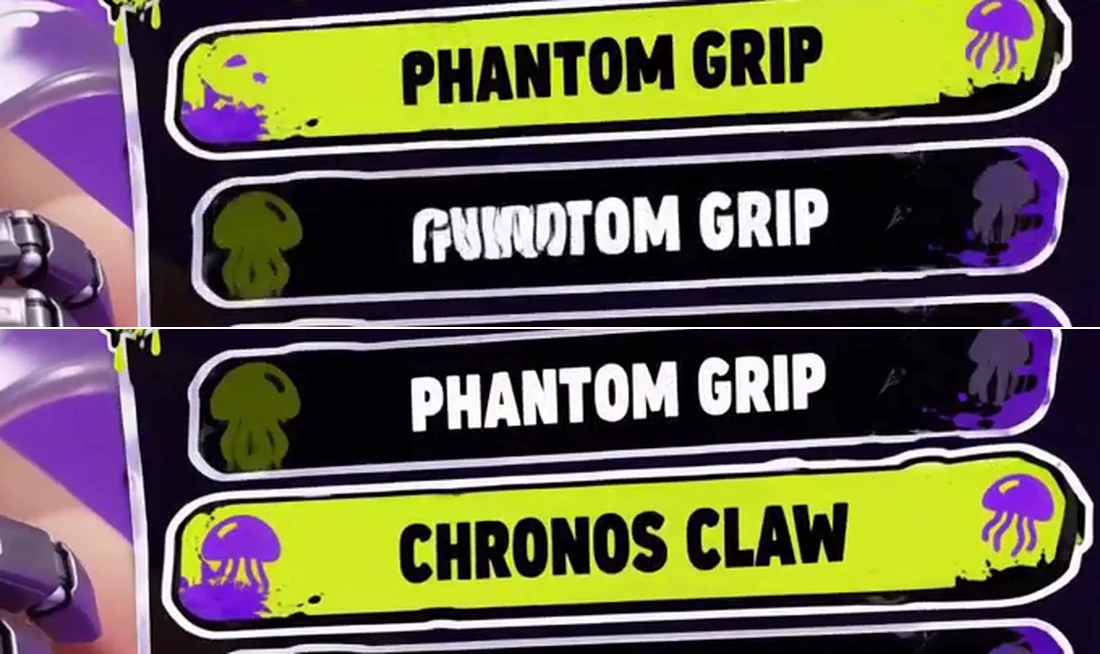
The top frame is the screenshot that gets posted with a caption about AI not being able to spell. The second row is a smeared half-formed duplicate of the row above it. It looks broken because it is broken — for about four tenths of a second, while the panel writes its second row in.
Then it resolves to CHRONOS CLAW and stays that way.
I counted the frames. The panel arrives at frame 56 and leaves at frame 103. The second row is unreadable from frame 56 to 65 and clean from frame 68 onward. At 24 fps that is a 0.4-second window inside two seconds of panel — about a fifth of its screen time looks like a spelling failure and is not one.
That matters more than it sounds, because a fifth is not the real odds of landing on one. When you drag a playhead you stop where something is happening, and the frames where something is happening are exactly the frames where the type has not settled. Scrubbing is biased toward the artefact.
So the first rule is procedural, not creative. Judge type on a frame where nothing is moving. And when you pull a thumbnail, pull it after the card locks, or you will ship the artefact yourself and someone will screenshot you.
Name a string and MiniMax H3 will spell it
Now the finding that changes how you write the prompt.
Both halves of the image below come from one clip, one generation, ten seconds apart:
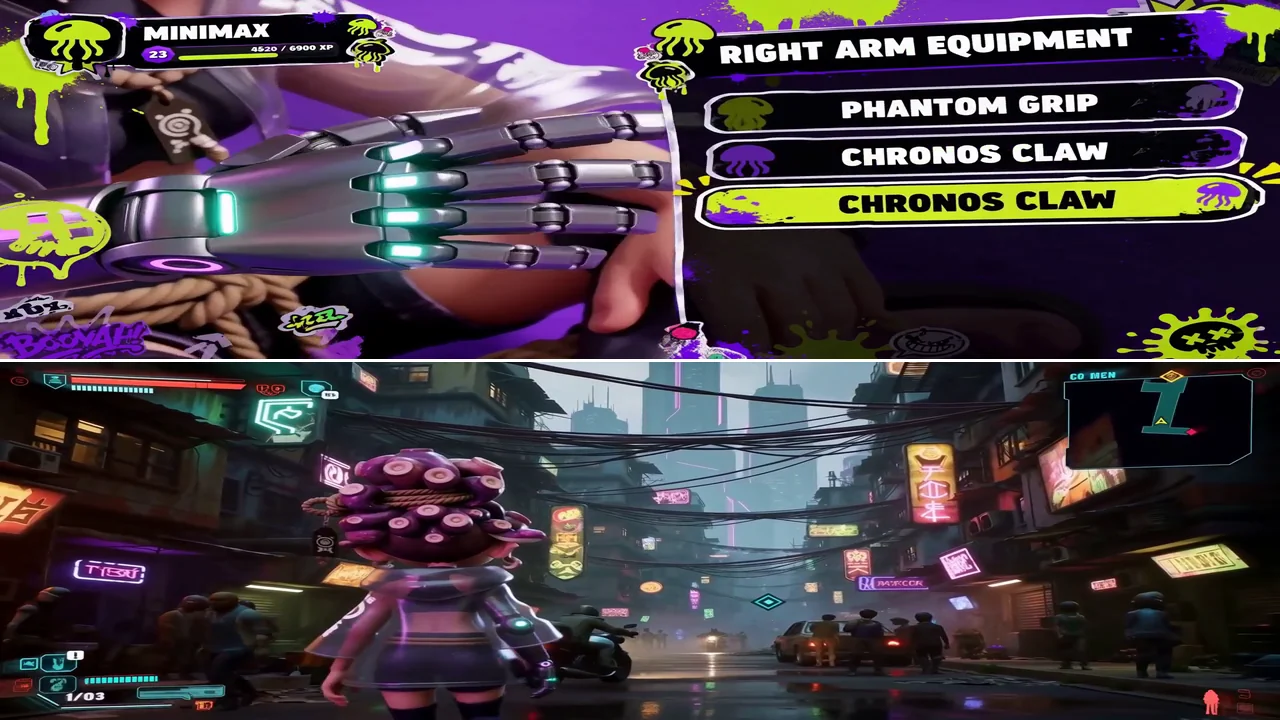
The top half is crisp. MINIMAX, RIGHT ARM EQUIPMENT, PHANTOM GRIP,
CHRONOS CLAW — correct, on panels that are sliding, under a camera that is
moving.
The bottom half is a street full of neon signage, and not one sign on it is a word. Same model, same clip, same seed, ten seconds later.
The prompt explains it completely. It names ten strings, and here is what came back:
| String named in the prompt | Rendered |
|---|---|
START NEW GAME | correct |
CONTINUE | correct |
SETTINGS | correct |
EXIT GAME | correct |
MINIMAX | correct |
RIGHT ARM EQUIPMENT | correct |
PHANTOM GRIP | correct |
CHRONOS CLAW | correct |
ARMAMENT CUSTOMIZATION | correct |
CONFIRM CONFIG | correct |
Ten for ten. For the street, the prompt asked for a cyberpunk city and said nothing about what any sign should say — so the model did the only thing available to it and painted sign-shaped texture.
This is the same behaviour the competing guides measured. They just never separated the two cases. "Text is rendered as texture, not as symbols" is a fair description of a background the prompt never wrote copy for. It is not a description of a string you handed over.
There is a third case in the same clip. The prompt asks for a grid "displaying hand, forearm, elbow, upper arm components". It describes the components, never a label string — and the grid comes back as icons with no text under them at all. Not garbled. Absent.
So far the rule looks like "named text is spelled, unnamed text is not." I believed that until I checked a product clip, and it is wrong.
The unnamed text that came out perfect
Here are two more clips. Neither one names the text you are about to read:
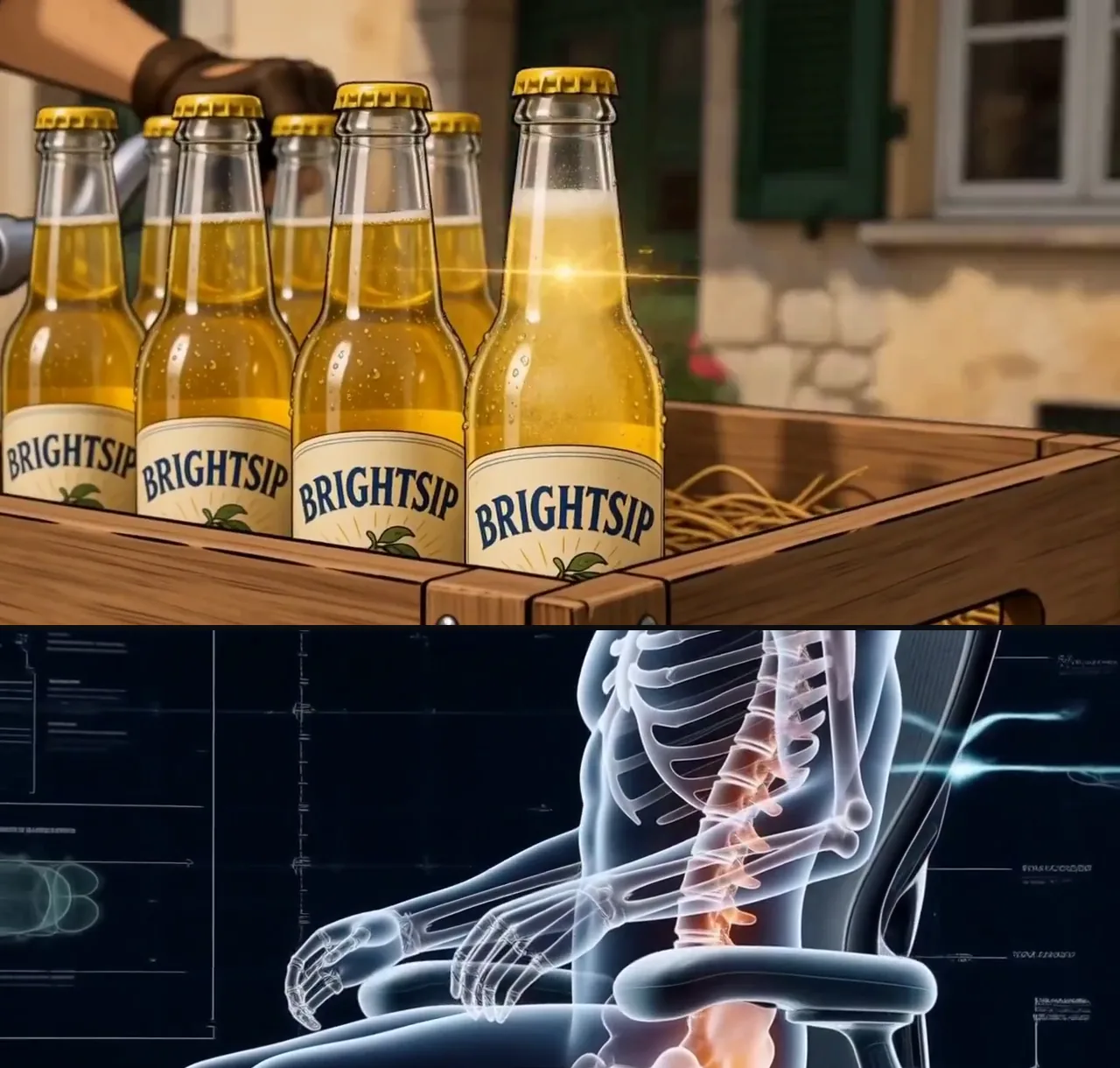
The top frame is a summer drink commercial. Its entire prompt is one sentence — a rider crosses a hill town, "opens a sparkling lemon drink", comic art. No brand. No label copy. Nothing in quotes at all.
The model invented BRIGHTSIP, put it on the bottle, and then spelled it
correctly on four labels in one frame at four different angles, again on the
hero bottle nine seconds later, and again on the end card — where it also
invented and correctly spelled the tagline TASTE THE SUN. Curved glass,
changing scale, moving camera, and the word never breaks.
The bottom frame is a photoreal chair advert. Its HUD annotations are unreadable smears, in the same clip whose end card carries eight correct characters.
Both halves are unnamed text. One is perfect and one is noise — so naming a string is enough to get it spelled, but it is not what decides whether a string gets spelled. What decides it is whether an individual string has a job in the shot. A product reveal is not a product reveal without a brand on the bottle, so the model supplies one and commits to it. A technical readout is scenery, and no particular word in it means anything, so the model paints the texture of a readout. Forty background neon signs are the same case as the HUD.
Naming is not the switch that turns spelling on. It is how you take the choice
away from the model. Left alone, H3 will name your product for you — and
BRIGHTSIP is a perfectly good invention that you did not choose, cannot brief,
and will not get again on the next take.
The same thing again, in photoreal, with the whole script invented
BRIGHTSIP is one word in a comic-art clip, which is easy to wave away. So here
is the case that is hard to wave away — a roast-duck product film, and every
word on it is the model's:
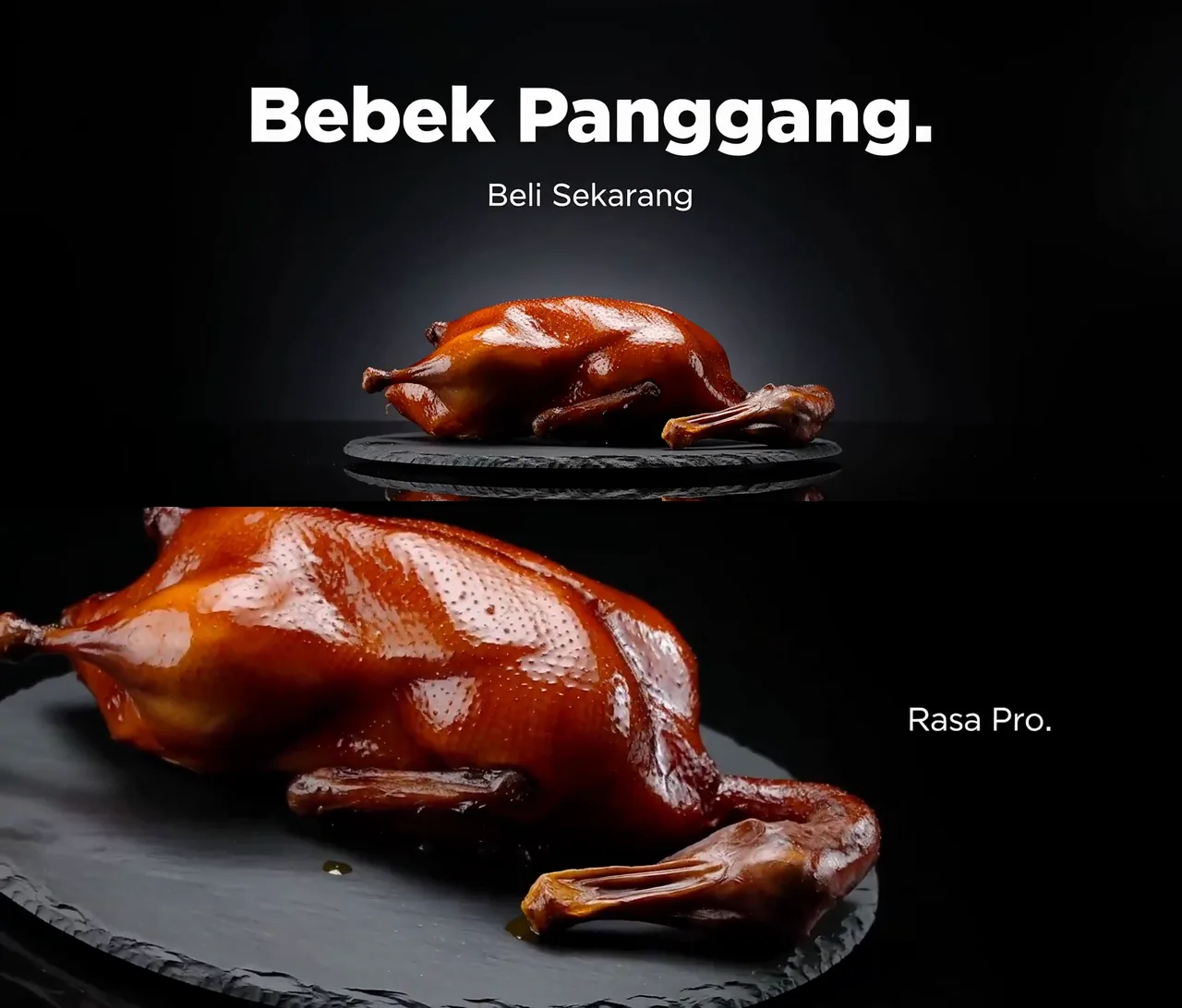
This is not drawn. It is a photoreal food commercial — studio lighting, wet specular highlights, a slate plate with a reflection. And its prompt is 655 characters that name no string at all. What it names instead is a language:
Use clean, lightweight sans-serif typography throughout, with generous negative space and a consistent visual system. All Bahasa Indonesia text must be spelled and rendered correctly.
The model wrote its own ad. Five lines, all Indonesian, all correct:
Memperkenalkan (introducing), Kulit Sempurna (perfect skin), Rasa Pro.,
Bebek Panggang. (roast duck) and Beli Sekarang (buy now). It also translated
the brief — the prompt says "Peking duck" in English, and the end card says
Bebek Panggang.
Two things fall out of that, and they matter more than the clip does.
Photoreal is not the variable. I had assumed the correct labels I was measuring were correct because they were drawn — flat lettering the model paints rather than a surface it has to light. This clip is as photoreal as the chair advert whose HUD panels are smears, and its type is perfect. Rendering style is not what separates them.
You can specify the language without specifying the words. This turns out to
matter, because the script you get is not automatically the script you wrote.
The chair clip named its end card in English — "Inspiration and Comfort Online
Simultaneously" — and the model rendered 灵感与舒适同时在线, the Chinese
equivalent, correctly. Correct, and not what was asked for. One line naming the
language is the whole fix.
Size is not the threshold people think it is
The most repeated number in this corner of the internet is that text below roughly 40 px tall garbles because the model runs out of pixels to spell with.
Measured on these clips, it does not hold. The interstitial cards in MiniMax's
trailer example are 29 to 30 px of cap height in a 1280×720 frame — under
the threshold — and THE MISSION WAS A LIE is spelled correctly. START NEW GAME measures 42 px and is also correct.
The smallest correct string I found is smaller still, and it is on the photoreal
clip: Rasa Pro. is a 22 px cap in a 1698×720 frame, three percent of the
frame height, and it is clean. Nobody named it either.
Small text does get harder. But on this model, height is not the thing that predicts whether a string comes out spelled.
How to name a string so it renders
Concretely, four things, all of them lifted from prompts that worked:
- Put it in quotes, in caps, exactly as you want it.
Cursor clicks "CONTINUE"is the form that works. Describing a button as "a continue button" gives the model a shape to paint, not a word to write. - Say where it sits. "Right side displays game menu UI", "Top left displays player profile". Text with a position is an object in the scene; text without one is decoration.
- Direct the type, separately from the words. MiniMax's trailer prompt spends 90 words on nothing but treatment — letter spacing, glow, "font not pure white", how it enters. None of it names a string, and all of it makes the strings that are named look art-directed rather than typed.
- Name the language, even when you are not naming the words. "All Bahasa Indonesia text must be spelled and rendered correctly" is the entire text instruction in the duck film, and every line came back Indonesian. Without it you get whatever the scene implies, which is how an English brief ends up with a Chinese end card.
And the corollary, which is the actual money-saver: an unnamed sign is never neutral. Whatever is written on it got decided by something, and if that was not you it was the model — either as texture you have to crop around, or as a brand name you now have to live with.
Where MiniMax H3 text rendering still breaks
Three honest limits, all of them visible in the clips above.
Layout is not spelling. Look again at the top half of the comparison image:
CHRONOS CLAW appears twice, on two stacked rows. Every letter is right and the
list is wrong. The model is a reliable typesetter and an unreliable UI designer,
and those are separate problems.
Set dressing stays gibberish, and there is a limit to naming your way out. You can name the three signs that matter. You cannot name forty of them, and a dense city street needs forty.
There is exactly one cell I cannot fill: photoreal type on a curved surface. Two variables are in play, and it is worth separating them, because most of the advice on this topic collapses them into one.
| Type on a flat plane | Type wrapped on a curved surface | |
|---|---|---|
| Drawn / comic | correct — trailer cards, game UI | correct — BRIGHTSIP, four angles on glass |
| Photoreal | correct — the duck film | no evidence either way |
The duck film rules out "photoreal is the problem." BRIGHTSIP rules out
"curvature is the problem." Neither of them rules out the two together, and
there is a physical reason to expect the combination to be the hard one: a drawn
label is a shape the model paints onto glass, while a photoreal one has to be
re-projected and relit at every new angle.
I went looking for that case and the library does not contain it. Of 102 entries, the one photoreal clip whose prompt actually asks for "ultra-slow rotating close-ups" is the duck, and a duck has no label. Creators working on photoreal bottle shots report the label breaking from the first frame and surviving neither image-to-video nor reference-to-video. I have not reproduced that and I am not going to assert it from someone else's screenshot — but it is the obvious place for this rule to stop, and it is the first thing I would test if the shot were mine.
These are curated examples. Four of the six clips are MiniMax's own showcase and two are community entries in the same library, so they represent a good day rather than an average one, and 22 for 22 is not a number you should expect to reproduce. What survives the selection bias is the pattern, not the score — and it survives partly because the gibberish is sitting right there in the same curated clips. A vendor cherry-picking would not have shipped that street.
For the one string that must be right every time
Named strings render correctly, and they are still a generation. Right on this take does not mean right on the next one, and if the string is your brand, your product name or your actual title, "usually right" is not a specification.
There is a route that removes the dice roll: put the words in a reference image. The model then has a lockup to match instead of letters to draw, so it is never rendering type at all and there is nothing to vary. In MiniMax's trailer example, the one two-line designed title card in the piece is exactly this — it is the input still, on screen at the head and again at the end.
The full walkthrough is in how to make an AI movie trailer with MiniMax H3, which is also where the beat-sheet timing lives.
So the division of labour is:
| Name it in the prompt | Put it in a reference image | |
|---|---|---|
| Best for | menu labels, interstitials, signage that matters | brand, product name, the real title |
| Correct now | yes, 22 for 22 in these clips | yes, for type that stays on a flat plane |
| Correct next take | it is a generation, so re-rolled | identical |
| Script and language | pin the language separately, or take what the scene implies | whatever the image says |
| Costs you | nothing | one reference slot |
The right-hand column has a boundary, and it is the same one as above. A title card is a plane the model can hold. A label wrapped around a bottle that turns is a surface it has to redraw at every new angle, and handing it a reference does not remove the redraw. Treat the reference-image route as settled for overlays and unproven for anything curved.
How to check your own clip in about a minute
Do not judge from the player. Lay the whole clip out at once, then go back at full resolution for anything that looks wrong:
# every other frame-ish, as one contact sheet
ffmpeg -i clip.mp4 -vf "fps=2,scale=320:-1,tile=5x7" -frames:v 1 sheet.png

# then the suspect moment, full size, exact frame
ffmpeg -i clip.mp4 -vf "select='eq(n,59)'" -fps_mode passthrough frame.png
If a string reads wrong on the sheet, pull the frames on either side before concluding anything. In these six clips, every string that looked broken at first pass turned out to be mid-animation — and while unnamed text is not automatically broken, everything that was broken was unnamed.
Try it
The quickest version of the test: write one line of quoted text into a prompt, generate at 8 seconds, and step through the result.
Text to video will do it from a sentence. If the words have to be exactly right every time, bring your own still to reference to video instead and let the image carry them.
The clips, prompts and reference images referenced here come from awesome-minimax-h3-prompts, CC BY 4.0. Four are credited to MiniMax; the lemonade commercial and the duck film are community entries in the same library, credited to Hemanth and to Feyber respectively. The duck film's prompt is quoted in full from its author's original post, because the library carries only an excerpt. Frame numbers, timings, cap heights and every string above were read off the files.

Written by
Editorial desk
minimax-h3ai.video
Published on the MiniMax H3 AI Video Generator, an independent third-party interface built on MiniMax H3.