How to make an AI movie trailer with MiniMax H3 (and get a title card you can actually read)
Cuts, score and seven title cards out of one H3 call. Short cards the model sets itself; the designed lockup comes from your reference still.
 Editorial desk
If you have tried to make an AI movie trailer, you already know where it falls
apart. The shots look fine. Then you ask for a title card and get
THE LAST FLEEF LFFT EARTH in a typeface nobody chose.
The usual advice is to give up on generated type — render silent, take it into an editor, set the title yourself. Before taking it, I pulled MiniMax's two official trailer examples apart frame by frame. Between them they carry twelve title cards, and once each one stops animating, all twelve are spelled correctly.
That is not a promise that yours will be; a showcase is curated. But it does say the ceiling is higher than the screenshots suggest, and it turns out to explain where a lot of those screenshots come from.
Fifteen seconds, seven cards, a score, all from one call. Here is how.
What an AI movie trailer out of one MiniMax H3 call looks like
Here is a trailer H3 produced in a single call. Fifteen seconds, five setups, hard cuts, the same character throughout, a score, and seven title cards:
It opens holding THE LAST FLEET LEFT EARTH with SHE WAS NOT ON BOARD set
underneath, cuts away, and runs THE FINAL DEPARTURE → EARTH SENT THE LAST FLEET → FINAL COUNTDOWN → WITHOUT HER → SHE KNEW WHY → THE MISSION WAS A LIE before coming back to that opening lockup to close on it.
Every word correct. No editor, no title plugin, no second pass.
Worth pausing on what did not happen there. The current advice for AI movie trailers is a five-tool stack: a chat model for the beat sheet, an image model for anchor frames, a video model for motion, one service for score and another for voiceover, then an editor to assemble it. That stack exists because most video models hand you silent shots.
H3 generates picture and 32 kHz stereo in the same pass, and it cuts between shots by default, so the score lands on the cut rather than near it. The five-tool stack collapses to one call and one still.
The MiniMax H3 trailer prompt, and what is missing from it
This is the whole thing:
Faster rhythm, grand but not dragging. Quick hard cuts, bridge
vibrations, intense light flashes, short black screens, jump shock
transitions. Text is movie trailer-style wide letter-spacing title
packaging, font not pure white, should have restrained glow and
texture, faint edge glow. Text animations include fading in from deep
space darkness, being swept by starlight, letter-spacing expansion,
motion trails, faint glow, black screen flashes.
Read it again and notice what is missing. No character. No location. No shot
list, and not one of those seven strings. MiniMax labels the whole thing
(Not a complete prompt, details can be added independently), so treat it as a
fragment — some of those lines may well have been typed into the part they did
not publish.
But one of the cards cannot have been typed anywhere, and that is the one worth your attention.
The one title card that belongs in your reference image, not the prompt
The request carried one reference image. This one:
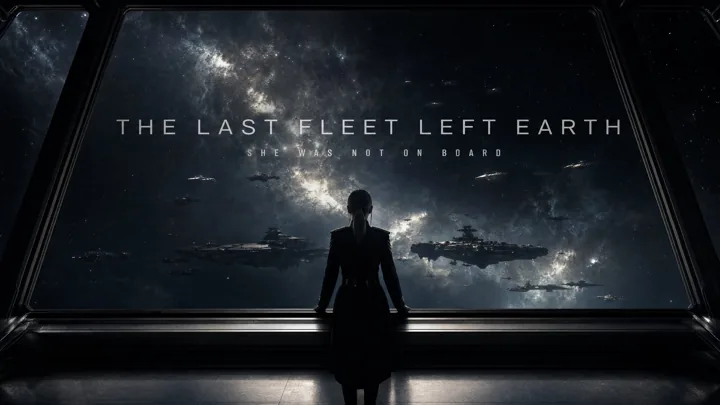
That is a finished piece of key art with the title already set on it. Now watch where it turns up in the clip.
The first eight frames — 0.000 s to 0.292 s — are that image, with a slow push in. Then a hard cut to black. At 12.5 s it comes back, and the trailer ends holding it.
So the two-line lockup is not something H3 spelled. It is the still itself, on screen at both ends with the camera moving over it. The tracked-out subtitle, the off-white it is set in, the letter spacing — none of it was ever generated, which is why none of it could go wrong.
The rule this gives you
Before drawing the obvious conclusion, look at the companion example, because it cuts the other way. MiniMax's second trailer clip carries five cards, and its title is in the prompt — spelled out, with a colour instruction attached:
A large title fades in from the dark edge, blurry first then clear: "THE STARS WERE LISTENING" font extremely narrow, heavy, all caps, dark red mixed with rust red
It came back correct, and it came back in the dark rust it asked for. The same
clip also lands NO ONE WAS MEANT TO HEAR IT — seven words across two lines —
without a mistake.
So the scoreboard across both official clips is twelve cards, all correct, described and supplied alike. Typing your titles into the prompt works. The distinction that actually matters is not description versus supply:
| Typed into the prompt | Set in the reference image | |
|---|---|---|
| Came out right | yes, in both official clips | yes, and it could not have come out otherwise |
| On the next take | it is a generation — rolled again every time | identical; the model never renders it |
| Colour | obeyed — asked for rust red, got rust red | exact — #bcc0c6, straight off your file |
| Cost | nothing | one reference slot |
| Bonus | — | it can bookend the clip |
So write your interstitials. Nothing bad happens, and you keep your reference slot. But the one card that has to be right on every take — a brand, a product name, the actual title — should not be a generation at all. Putting it in the image takes it out of the lottery.
And if you compose that image as a finished frame rather than a mood board, you get it twice. Note that this is a property of what you hand over, not of Ref2VA itself: the companion clip's references were an atmosphere board and a character portrait, and it opens on neither.
Which flips the order of work. You do not write a trailer and then add a title. You design the last frame first, then ask for the fifteen seconds that arrive at it — and it doubles as your opening flash.
Making the key art, when you are not a designer
This is the step everyone skips past, so here it is concretely. You need one still, at your final aspect ratio, containing four things:
- The title, set the way you want it. Wide letter spacing, all caps, and
not pure white. I sampled the glyph row in the official still and it peaks
at
#bcc0c6— a faintly cool grey, around 78% brightness. That one choice is most of why the card reads as designed rather than typed, and it is why MiniMax's own prompt says "font not pure white". Knock your title back off#ffffffand it stops looking like a caption. - A subtitle line if you want one.
SHE WAS NOT ON BOARDis doing real work; it turns a title into a premise. - The composition you want at both ends. Whatever sits behind the type is the frame your trailer opens on and the frame it lands on, so put your subject in it and compose it as a finished shot, not as a backdrop.
- The mood. Grade, grain and light all travel across with the image.
Any image tool will do this, and so will a slide in Figma or Canva — the type does not have to be generated, it has to be legible and final. Export at 1280 on the long edge or better.
One thing worth knowing before you shoot it: a reference image brings its own lighting with it. If the still is cold and moody, the whole trailer comes back cold and moody, no matter what the prompt says. Pick the light you want in the finished piece, not the light that looks best on the poster.
Fifteen seconds is a teaser, and that is the format worth making
Say this out loud before you plan anything: a MiniMax H3 clip tops out at 15 seconds. A theatrical trailer runs 90 to 150. If you came here to build a two-minute trailer in one shot, no model does that today.
What 15 seconds is, exactly, is the social cut-down — the teaser format that runs on TikTok, Reels and Shorts, which is where trailers are actually watched now. It is also the format the five-tool stack is worst at, because assembling a 15-second piece costs the same setup as a 90-second one.
If you need length, the move is not a longer generation. It is several of these, each arriving at its own card, cut together — and each one is still one call instead of twelve.
Ask for 8 seconds or 15, nothing in between
Small thing, easy to get wrong, and it shows up in exactly one place: the last beat.
H3 renders in fixed blocks — 17n + 5 frames at 24 fps — so the duration you
type gets snapped to the nearest legal one. Both official trailer clips come
back at 362 frames, which is 15.083 seconds, not 15.
That fraction is harmless in a normal shot. In a trailer you are timing a card to land on a beat, so it matters. 8.000 seconds is the only whole second available, and 15.083 is the top of the range. Pick one of those two, write your timings against it, and the last card lands where you put it.
| You want | You get |
|---|---|
| ~8 s | 8.000 s (192 frames) |
| ~10 s | 10.125 s |
| ~12 s | 12.250 s |
| ~15 s | 15.083 s (362 frames) |
The frame that made me think H3 could not spell
I pulled a still from the companion example to check the type and got this:
THE STARS W RE LISTENMissing letters, dropped tail. Looked like exactly the failure everyone warns
about — until I checked the neighbouring frames. One second later the same card
reads THE STARS WERE LISTENING, subtitle and all, perfect.
The cards animate by expanding their letter spacing, so every one of them spends a few tenths of a second mid-resolve. Nothing was wrong. I had judged a card from a frame taken while it was still arriving.
This is worth sitting with, because it is almost certainly where a share of the "H3 cannot spell" screenshots come from. A card that is mid-resolve looks exactly like a card that is broken, and scrubbing a timeline lands you on those frames far more often than chance — they are the ones where something is visibly happening.
Two things follow. Judge the type from the settled frame, not from scrubbing. And when you pull a thumbnail, pull it after the card locks — otherwise you ship the artefact yourself, and someone screenshots you.
Chasing that down turned into its own piece: across six clips, every string a prompt actually named came out spelled, and the interesting cases are the strings nobody named. What MiniMax H3 does with text you did not name has the frame counts.
What the prompt half controls: cut rhythm and type treatment
Once the image carries the lockup, the text does two jobs, and both are worth copying:
It sets the cut rhythm. "Quick hard cuts, bridge vibrations, intense light flashes, short black screens, jump shock transitions" is a five-item menu and the model uses all five. The one I would not drop is short black screens — a trailer needs somewhere to breathe before its last card, and black is the cheapest way to buy it. Take it out and fifteen seconds of cutting reads as noise.
It sets the type treatment for every card at once. Fade from darkness, starlight sweep, letter-spacing expansion, motion trails, black screen flashes. This is the half that makes the six generated cards look like they belong to the one designed card — same glow, same tracking, same entrance. Keep it verbatim when you swap the reference image and your own six will match your own lockup.
What a MiniMax H3 trailer costs to run
A fifteen-second trailer is 62 credits at 768P and 122 at 2K. The eight-second cut is 34 and 66. Your reference still is free — the first five are. Every plan burns at the same rate, so none of these numbers move when you change tier.
Two parts of that arithmetic are specific to trailers.
The resolution costs more than the ratio does. Going from 768P to 2K doubles the per-second burn; going from 16:9 to 21:9 adds half. Fifteen seconds of 2K scope is 182 credits, where the same shot at 768P scope is 92. Scope is the trailer format's house style, so set it on purpose — but if something has to give, the cheaper lever is the resolution, not the shape.
A draft is a second run, not a discount. There is no upgrade button — a 768P take and a 2K take are two generations and two charges. So make the draft earn it: eight seconds, 768P, 16:9, which is 34 credits, under a fifth of one full-length 21:9 take at 2K. Whether your cuts land on the beat is fully audible at 768P, and the beat is the only thing worth iterating on. Spend the long take once the rhythm holds.
The full table is on pricing.
Try it
The prompt above, the reference still, and the finished clip are all on one page: sci-fi trailer prompt for MiniMax H3.
Bring your own key art and paste the grammar into reference to video. If you want to feel out the cut rhythm before you make a still, text to video at 8 seconds will get you the pacing without the card.
The example clip, prompt and reference image are MiniMax's own, published under CC BY 4.0 in awesome-minimax-h3-prompts. Frame counts, timings and the title strings above were read off the files.

Written by
Editorial desk
minimax-h3ai.video
Published on the MiniMax H3 AI Video Generator, an independent third-party interface built on MiniMax H3.