P—11 / PET KNITWEAR LOOKBOOK

Fashion lookbook video prompt for MiniMax H3

Four subjects, four sets, fifteen seconds, and every garment still legible.

A product-show video for four knitted pet sweaters. What makes it a template rather than a one-off is the repeating unit: each subject gets the same four-shot pattern — front, detail, texture, turn — in its own colour-matched set. Write the unit once and the film is four copies of it plus an ending.

Steps
2 steps
Mode
Image to Video
Duration
15s
Ratio
9:16
Resolution
2K
Audio
Upbeat bed + light foley
Cost
$1.95

Reference render — not generated on this site. Source: pollo.ai

Output reference

Four dogs in knitted sweaters arranged as a lookbook plateImage
Step 01 — the still
Four dogs modelling knitted sweaters against colour-matched studio setsVideo
Step 02 — the clip

JPG · PNG · WebP · HEIC · 30 MB

2997 / 7000

Images 0/9 · Clips 0/3 · Audio 0/3 · 12 files max

No card, no account: watch and download 12 real MiniMax H3 clips, and run one prompt of your own on Agnes Video V2.0 — 16:9, watermarked, once. After that, sign in free for 3 clips a day on the free engine. MiniMax H3 on your own prompt starts at $24.9 a month.

1 FREE CLIP · WATERMARKED

02 — Inside

Two prompts, one workflow

Each step is the result beside the text that produced it. Copy either prompt into the console above.

Reference output, step 01
Four dogs in knitted sweaters arranged as a lookbook plateImage
The still
Step 01the stillAny image model
1,444 chars

The line-up plate

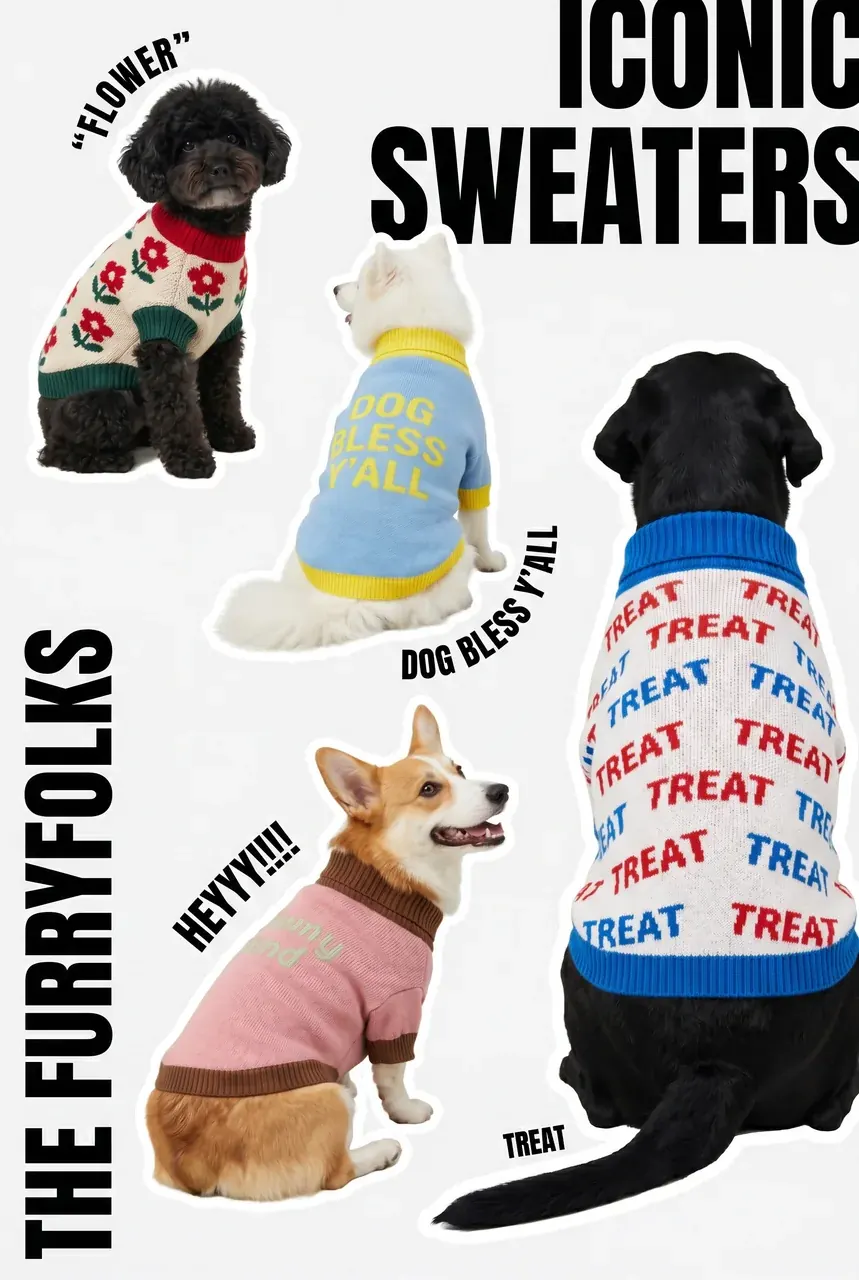
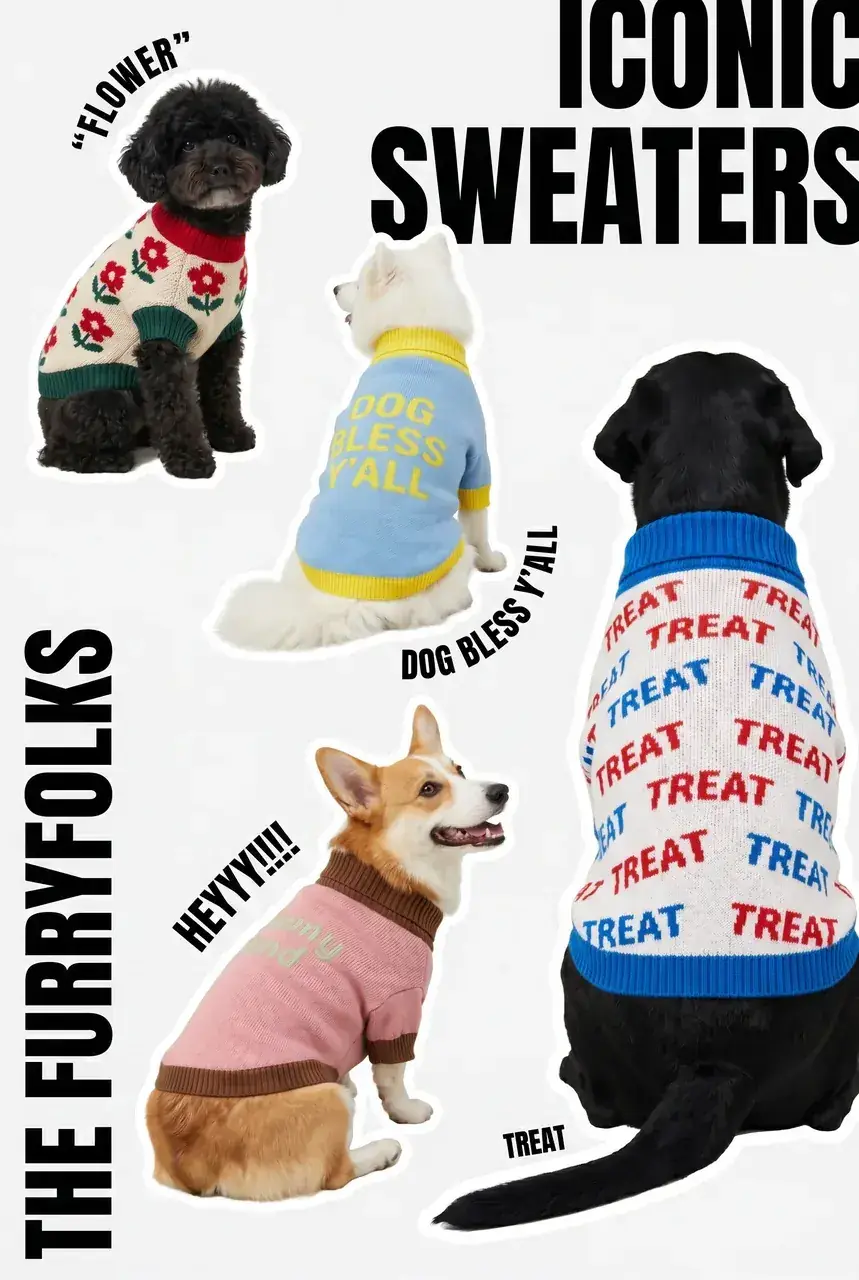
One plate carrying all four looks. The video pass reads it as a wardrobe reference, so every garment has to be readable in a single frame.

Clean studio product plate, vertical 2:3, four separate pet knitwear looks arranged on a pale neutral background as cut-out product shots.

SUBJECTS AND GARMENTS:
Top left — a small black curly-coated toy poodle sitting front-on, wearing a cream knit sweater patterned with red flowers, a red ribbed collar and a dark green ribbed hem.
Upper middle — a fluffy white spitz seen from behind and slightly to the side, wearing a sky-blue sweater with a yellow ribbed collar and hem and bold yellow lettering across the back.
Right — a black labrador seen from directly behind, wearing a cream sweater printed with repeated red and blue lettering, with a bright blue ribbed collar and hem, tail extending down the frame.
Bottom middle — a corgi sitting in profile facing right, ears up, mouth open in a relaxed pant, wearing a soft pink sweater with a brown ribbed collar and hem and pale green lettering.

TREATMENT:
Each animal photographed separately on white and composited as a clean cut-out with a fine white outline, arranged with generous space between them. Even soft studio lighting on every subject, no cast shadows, consistent colour temperature across all four.

RENDER:
Photoreal, sharp knit texture with individual stitches visible, natural fur detail, accurate garment fit with visible ribbing at collar and hem.

RESTRICTIONS:
No brand marks, no logos, no watermark, no human hands, no props, no background scenery, no drop shadows.
Paste it into whichever image model you already use. We do not run one here yet — when we do, this button generates instead.

Reference output, step 02

Four dogs modelling knitted sweaters against colour-matched studio setsVideo
The clip
Step 02the clipMiniMax H3 · Image to video
2,997 chars

The lookbook

Four timed segments running the same shot pattern, then a group hero. The pattern is the template.

Create a product video ad from [image1].

9:16, 24fps, 15 seconds. A premium pet-fashion product show featuring four dogs in statement knit sweaters. Playful, stylish, editorial and lively, like a trendy pet-fashion campaign. Each dog appears in a themed background matching its sweater design, never a plain white backdrop. Focus on cuteness, knit texture, sweater fit, colour, collar, hem, front look, then brief side and back detail reveals. Fast, energetic, visually polished.

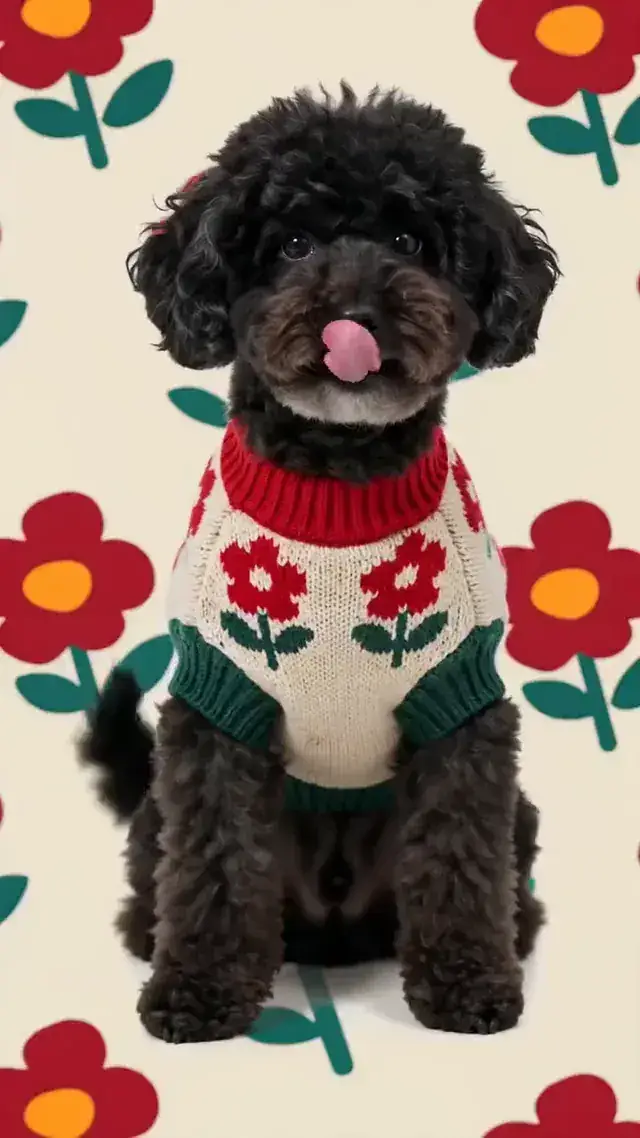
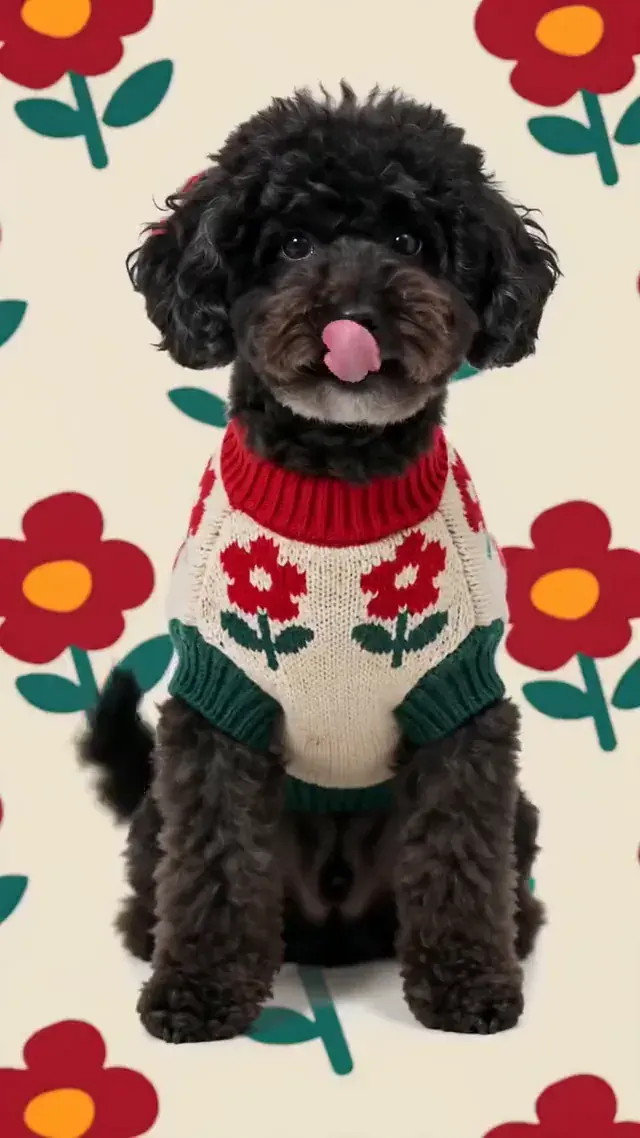
0–2.5s — Dog 1, flower sweater: the small fluffy black dog appears front-facing, wearing the cream knit sweater with red flower motifs, red collar and green hem. Background is a warm garden-inspired set in cream tones with oversized red floral graphics. It looks into the camera, tilts its head, sits proudly. Start on a clean front shot, then cut to closer details of the flower pattern, collar and knit texture, then a slight turn showing side shape. SFX: upbeat playful music, soft chime.

2.5–5s — Dog 2, blue sweater: the fluffy white dog appears front-facing, then turns to show the sweater. Sky-blue body, yellow trim, bold lettering across the back. Background pastel sky-blue with soft yellow sunny graphics. Front shot first, then pivot to a side and partial back reveal so the back print is visible. Show the ribbed collar, clean fit, soft knit texture. SFX: light pop beat, soft swoosh.

5–7.5s — Dog 3, lettering sweater: the black dog appears front-facing, then shifts to reveal the design. Cream sweater with repeated red-and-blue lettering, bright blue collar and hem. Background a candy-pop set of red and blue graphic blocks. Front pose first, then a closer angle on the all-over print and a seated turn showing the blue trim. SFX: rhythmic bass pop, quick whoosh.

7.5–10s — Dog 4, pink sweater: the corgi appears front-facing, smiling with ears perked, in the soft pink sweater with brown collar, brown hem and pale green lettering. Background a cute pink studio set with cosy rounded shapes. Clear front shot, then slight side angles and close-ups of the brown trim, pink knit, green lettering and the dog's happy face. SFX: bubbly percussion, playful chimes.

10–15s — Final collection hero: all four dogs together in one lineup, each sweater clearly visible. Background a coordinated set combining floral, sky-blue, candy-pop and soft pink elements in a clean campaign composition. Quick cuts between the four — front faces, knit textures, collars, hems, head tilts, ear perks, wagging tails — then settle on a clean final group shot arranged like a premium campaign end frame. Do not end on the reference plate layout; end on a custom group shot made for this video. SFX: music builds to a polished finish with a bright chime.

Negative Prompt: no plain white background, no cluttered staging, no dark lighting, no stiff poses, no distorted animal anatomy, no blurry sweater details, no messy props, no excessive text, no low-quality knit texture, no ending in a poster-style collage layout.

4 levers

Make it yours

What is safe to change. Most libraries publish only this list, which is why so many copied prompts come back worse than the original.

  1. 01

    The four-shot unit

    Front, detail, texture, turn. Every segment runs the same four beats in the same order, which is why 2.5 seconds is enough for each. Change the unit once and it changes for all four subjects.

  2. 02

    The colour-matched sets

    Each background is built from the colours already in that garment. This is what stops four cuts in ten seconds from looking chaotic, and it is a rule you can apply to any multi-SKU product film.

  3. 03

    The subjects

    Four dogs is arbitrary. Four models, four bottles, four chairs — the structure is about presenting a range, and the only requirement is that the four are visually distinguishable at a glance.

  4. 04

    The anti-collage instruction

    "Do not end on the reference plate layout; end on a custom group shot" exists because the model will otherwise reproduce the input image as the final frame. Any time your reference is a composite, you need a line like this.

Three ways to break it

  • Letting the model end on the reference plate

    When the reference image is a multi-subject composite, the easiest possible final frame is the reference itself, and the model will take it. The result is a video that ends on a still it started from, which reads as a failure even to viewers who never saw the input.

  • Giving each subject a different shot pattern

    The pattern is what makes four subjects in ten seconds legible. Vary it and the viewer spends each segment working out what they are being shown instead of looking at the garment.

  • Asking for a brand logo in the end frame

    The source prompt requested one. Models render logos as approximations, and an approximate logo in the final frame of a campaign film is worse than no logo — add it in post, where it will be correct.

What it does

What the pet knitwear lookbook template does

The interesting thing about this prompt is not any individual instruction, it is that the same four instructions appear four times with different nouns. Front-facing establishing shot, cut to pattern and trim detail, hold on knit texture, then a partial turn. Four times, once per garment.

That repetition is what buys the pacing. Two and a half seconds is not enough time to introduce a subject and show a product unless the viewer already knows the shape of what they are about to see, and by the second segment they do. The first segment teaches the grammar; the remaining three run it. This is how every multi-SKU product film works, and writing it explicitly into the prompt is the difference between four segments that feel like a campaign and four segments that feel like four unrelated clips.

The colour-matched backgrounds are the other half of the same idea. Each set is built from the palette already in the garment — cream and red for the floral, sky blue and yellow for the second, red and blue blocks for the third, pink and brown for the corgi. Because the background changes with the product, the cut between segments reads as a deliberate chapter break rather than as an error. And because each background is drawn from its own garment, the garment never has to fight its set for attention.

There is one instruction here that will not be obvious until it has cost you a generation. "Do not end on the reference plate layout; end on a custom group shot made for this video." The reference image for this template is a composite: four cut-out subjects arranged on a neutral field. When a video model is asked for a final group shot and it has been handed a group shot as its input, the path of least resistance is to reproduce the input. You get a fifteen-second film that ends on the still it began from. Any time your reference image is a composite or a poster, you need an explicit instruction not to return to it.

The negative prompt is mostly aesthetic, in the same way as the fragrance template further up this page, but two entries are structural. "No plain white background" rules out the studio default that the cut-out reference would otherwise suggest. "No distorted animal anatomy" is doing real work — quadrupeds in clothing are one of the reliably difficult cases for video models, because the garment hides the body and the model has to infer the skeleton underneath it. Naming the failure directly measurably reduces it.

On what we changed: the source ended with an instruction to place a brand logo in the corner of the final frame. We removed it. A logo generated by a video model is an approximation of a logo, and an approximate logo is worse than none — it is the one element of a campaign film that a viewer can check against a known ground truth. Composite it in post.

Everything here runs in image to video.

6 questions

Pet knitwear lookbook — common questions

  • 01

    How do I show four products in fifteen seconds?

    Give every product the same shot pattern and change only the product and its background. The first segment teaches the viewer the grammar and the other three can then run in two and a half seconds each.

  • 02

    Why match each background to its product colours?

    It makes each cut read as a chapter break rather than an error, and it stops the set competing with the product for attention.

  • 03

    My reference image is a poster with several products on it. Is that a problem?

    Only if you do not account for it. Add an explicit instruction not to end on the reference layout, or the model will reproduce your input as the final frame.

  • 04

    Can I get a brand logo in the end card?

    Not reliably. Video models render logos as approximations, and that is the one element viewers can check. Add it in post.

  • 05

    Why call out anatomy in the negative prompt?

    Because clothed animals hide the skeleton the model is inferring, and it is one of the more common distortion cases. Naming it directly reduces it.

  • 06

    Does this only work for pets?

    No. The structure is about presenting a range. Four bottles, four chairs, four colourways of the same jacket all use the identical pattern.

Copy it, change three things, run it.

Every character is on this page. 15s at 2K costs $1.95.

Sign in free · 3 clips a day